Stop an Insta360 X4 from overheating during recording
Separate normal surface heat from an overheat shutdown, then reduce processing load, charging heat, sun, enclosure, and accessory load without thermal shock.
Direct answer
The shortest reliable path.
If the X4 shows a temperature warning or stops recording, power it off and let it cool naturally in a dry, ventilated place. Do not place the hot waterproof camera in water or against an air-conditioner vent: Insta360 warns that rapid temperature change can cause moisture or damage. For the next test, remove unnecessary powered accessories, avoid charging while recording, move out of direct sun, and lower a demanding mode such as 8K or 60 fps when the shot allows. The camera saves the current recording when its documented overheat protection triggers; persistent abnormal heat or shutdown after these controlled changes requires Insta360 service.
Official visual references
Match what you see before you act.
These visuals are tied to the cited support pages. Read each model scope and observation before using it as a match.
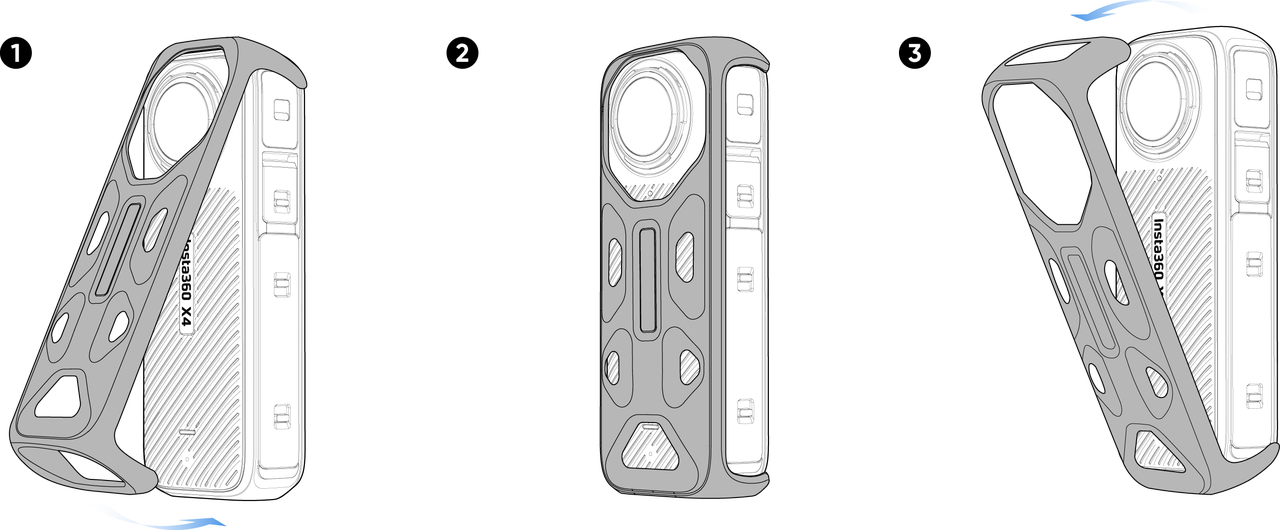
Install and remove the X4 Thermo Grip Cover
Insta360’s three-step diagram shows the cover fitted from the top and removed by gently pulling from the top edge.
- Look for
- Keep the camera dry, protect both lenses while fitting the cover, and do not confuse a surface-temperature accessory with a way to bypass heat protection.
- Applies to
- Insta360 X4 Thermo Grip Cover for appropriate dry handheld use; water, excluded sports, and incompatible frames or cases are outside this visual.
System view
Check the whole path.
- 01Ambient temperature and airflow
- 02Resolution, frame rate, and processing features
- 03Charging and powered accessories
- 04Camera heat protection
- 05Saved file and service decision
Scope before steps.
Insta360 X4 recording in high-resolution or high-frame-rate modes, hot or still environments, while charging, or with powered accessories.
Battery swelling, liquid ingress, crash damage, third-party thermal modifications, other Insta360 models, or a recording stop caused by the microSD card rather than temperature.
Procedure
Do this in order.
- 01
Let the protection event finish safely
Power the camera off and leave it dry in naturally moving air until the body and battery return to a normal handling temperature.
- 02
Reproduce with one demanding factor removed
Test outside direct sun in a ventilated location, then lower 8K or high-frame-rate recording to a less demanding mode only if it still meets the shot requirement.
- 03
Remove charging and accessory heat
Disconnect external power, Quick Reader, or other unnecessary powered accessories for the controlled test.
- 04
Use the Thermo Grip only in its allowed setting
Fit the dry Thermo Grip Cover from the top down for prolonged handheld 8K use, but remove it for water, skiing, cycling, motorcycling, or incompatible frames and cases.
- 05
Run a timed comparison and preserve the result
Record the same scene with the same card and battery, changing one heat factor at a time, and note whether the warning, shutdown time, and saved file behavior change.
Diagnostic matrix
Read the result, not the guess.
| What you see | Check next | What it means |
|---|---|---|
| Camera is warm but records normally | Compare it with the documented indicator and warning behavior rather than judging only by touch. | Compact high-resolution cameras normally generate heat; a warning or shutdown is the stronger diagnostic signal. |
| Recording stops and the LED is solid yellow | Check storage and file state before treating the event as heat. | Insta360 assigns solid yellow to insufficient storage, file error, or USB error, while a temperature condition flashes yellow three times. |
| Heat appears mainly while charging or using accessories | Repeat on the internal battery with unnecessary external devices removed. | The extra electrical load is a likely contributor, not proof of an internal camera fault. |
| Overheat protection stops the recording | Let the camera cool, then verify the last file before formatting or starting an irreplaceable shot. | Insta360 says X4 automatically saves the active recording when documented overheat protection triggers. |
Stop conditions
Know when not to keep changing things.
- Do not cool a hot X4 in water, a refrigerator, or directly against an air-conditioner vent.
- Do not use the splash-resistant Thermo Grip Cover in or around water or in the excluded high-motion sports listed by Insta360.
- Request Insta360 service if the camera becomes abnormally hot to touch or repeatedly shuts down after controlled lower-load, dry, ventilated testing.