Fix a Roomba Combo that detects the wrong bin
Restore bin detection on Combo i5 and j5 models by cleaning the dry optical path, clearing the vacuum path, and containing any dock moisture.
Direct answer
The shortest reliable path.
For a Roomba Combo i5/i5+ or j5/j5+ that reports the Combo Bin while the standard Dust Bin is installed, remove the filter, rinse the bin and bin door, let both air-dry fully, and wipe the robot’s full-bin sensors with a clean dry cloth. Clear the brushes and vacuum path, paying special attention to the inner bin-door ports. Reboot by holding CLEAN for 10 seconds. If water reached a Clean Base bag, discard the wet bag and dry the base before reuse.
Official visual references
Match what you see before you act.
These visuals are tied to the cited support pages. Read each model scope and observation before using it as a match.
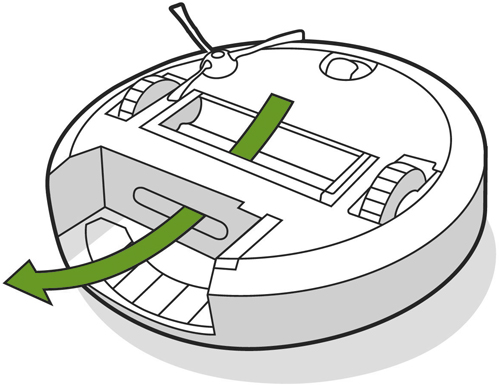
Combo vacuum-path access
Use this official diagram to locate the documented vacuum path; it is not permission to rinse the robot body or electronics.
- Look for
- Match the underside layout, remove only the supported parts, and inspect the exposed channel for accumulated grime.
- Applies to
- Combo i5/i5+ and j5/j5+ cleaning steps referenced by iRobot’s bin-detection support article.
System view
Check the whole path.
- 01Installed bin
- 02Bin-door ports
- 03Robot full-bin sensors
- 04Vacuum path
- 05Bin-type detection
Scope before steps.
Roomba Combo i5/i5+ and Combo j5/j5+ robots that identify the Combo Bin when the standard Dust Bin is installed.
Other Combo generations, damaged bin magnets or electronics, liquid recovery from electrical compartments, or using the robot or dock on wet surfaces.
Procedure
Do this in order.
- 01
Clean and dry the standard bin
Remove the filter, rinse the bin and bin door with water, and let both air-dry completely before reassembly.
- 02
Clear sensors and port surfaces
Wipe the robot full-bin sensors with a clean dry microfiber or soft cotton cloth, including the inner ports inside the bin door where dust collects.
- 03
Open the vacuum path
Remove the brushes, clear loose debris, and clean built-up grime from the documented vacuum path with the approved melamine-foam method.
- 04
Reboot the robot
Reinstall the fully dry parts, then press and hold CLEAN for 10 seconds. Recheck which bin the app or robot detects.
- 05
Contain any dock moisture
If a Clean Base evacuated water, remove and discard the wet bag, wipe remaining moisture with a clean dry cloth, and leave the base dry before service or reuse.
Diagnostic matrix
Read the result, not the guess.
| What you see | Check next | What it means |
|---|---|---|
| Correct bin is detected after cleaning and reboot | Run the intended vacuum-only or Combo mission with the correct bin. | Contamination in the documented sensing or vacuum path was associated with the misidentification. |
| Inner bin-door ports still contain compacted dust | Finish the dry optical-path cleaning before another reboot. | The official sensor-cleaning condition has not been met. |
| Moisture is present in the evacuation bag | Discard the bag and dry the base; do not run another evacuation. | The issue now includes a moisture hazard, not only bin identification. |
Stop conditions
Know when not to keep changing things.
- Do not rinse the filter, robot body, dock, or other parts unless the exact product instructions identify them as washable.
- Do not pour liquid into the robot or dock, immerse either device, or operate them on wet surfaces.
- Contact iRobot if the correct dry bin remains misidentified after the complete cleaning and 10-second reboot.