Respond to an iPhone temperature warning without damaging it
Distinguish normal warmth from thermal protection, cool the device safely, and use the disabled feature as diagnostic evidence.
Direct answer
The shortest reliable path.
If the temperature warning appears, turn off the iPhone, move it out of direct sunlight into a cooler environment, and let it cool naturally. Do not keep charging or running navigation, camera, games, or other heavy tasks. Apple designs iPhone for ambient use from 0 to 35°C (32 to 95°F); charging, display brightness, cellular radios, camera features, and performance can be limited outside the normal internal temperature range and resume after the device cools.
Official visual references
Match what you see before you act.
These visuals are tied to the cited support pages. Read each model scope and observation before using it as a match.
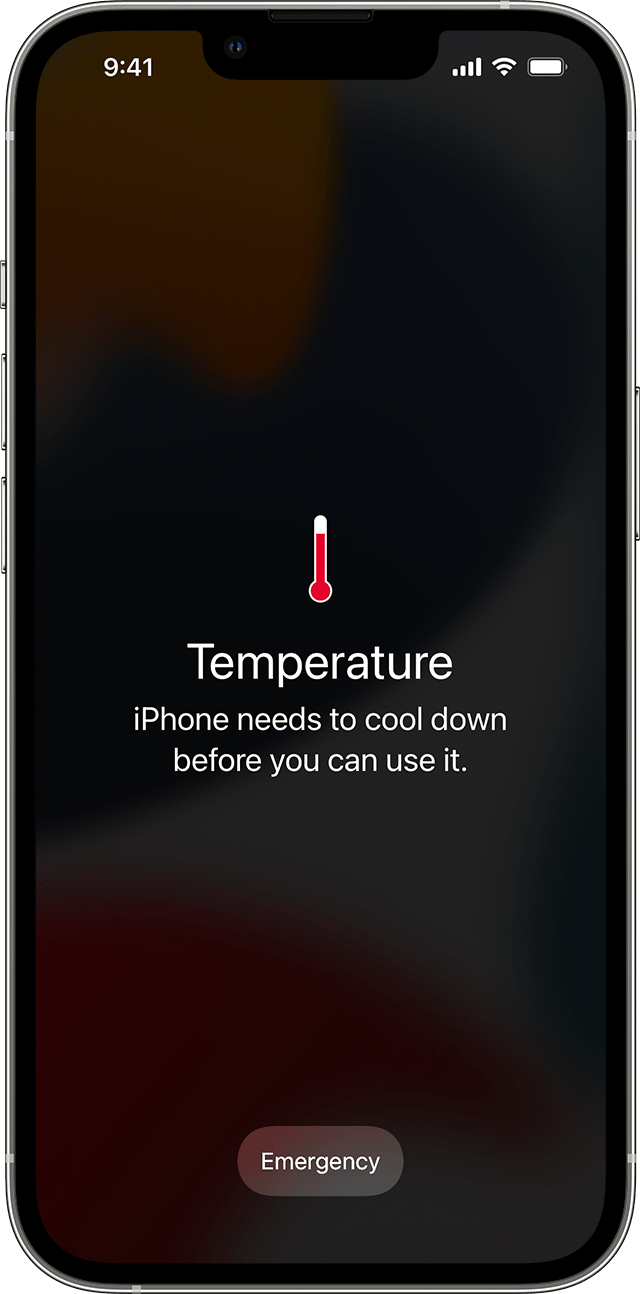
Apple temperature warning screen
This full-screen warning marks a protection state: Apple directs the user to turn the device off, move it away from sunlight, and let it cool.
- Look for
- Do not dismiss the screen as an app error; stop the workload and remove the environmental heat source.
- Applies to
- iPhone temperature-warning behavior represented by Apple’s support example.
System view
Check the whole path.
- 01Ambient temperature and workload
- 02Internal temperature management
- 03Feature throttling
- 04Temperature warning or charging pause
- 05Natural cooldown and retest
Scope before steps.
iPhone and iPad devices that become unusually warm, show Charging On Hold, dim the display, disable camera features, or display Apple’s temperature warning.
A swollen battery, smoke, liquid exposure, impact damage, a device too hot to touch safely, or opening the enclosure.
Procedure
Do this in order.
- 01
Distinguish warmth from a thermal warning
If the device is merely warm during setup, restore, update, wireless charging, gaming, camera use, or high-quality streaming and no warning appears, end the workload and observe. If a warning or feature shutdown appears, continue with cooldown.
- 02
Remove heat input and power down
Unplug charging, leave direct sunlight or the hot vehicle, turn the device off, and place it in a cooler shaded environment.
- 03
Allow protections to clear naturally
Wait without running camera, navigation, games, restore, or charging. Power the device on only after it has cooled and the warning is gone.
- 04
Retest the original condition once
In the supported ambient range, repeat the original task without direct sun and monitor whether the same warning returns unusually quickly.
Diagnostic matrix
Read the result, not the guess.
| What you see | Check next | What it means |
|---|---|---|
| The phone is warm but shows no warning or disabled feature | Finish the current update, restore, charging, camera, or processing task and observe cooling. | Apple describes warmth during these workloads as expected behavior. |
| Charging On Hold appears | Disconnect or stop the charging session and let the device return to normal temperature. | Charging has been paused by temperature protection and should resume automatically when conditions normalize. |
| The display dims, flash disappears, or performance drops | End the heat-producing task and begin cooldown. | These are documented stages of iPhone temperature regulation. |
| The warning quickly returns in a normal room during light use | Record the task, ambient temperature, battery condition, and recurrence, then contact Apple Support. | The repeatable behavior is no longer explained by the original hot environment or heavy workload alone. |
Stop conditions
Know when not to keep changing things.
- Do not keep charging, filming, gaming, or navigating through a temperature warning.
- Do not attempt to disable thermal protection or rapidly cool the device with liquids or an uncontrolled temperature change.
- Stop using the device and seek service immediately if the battery swells, the enclosure separates, smoke appears, or the device is unsafe to touch.