Start with what you see
Let the result choose the next step
Original Joy-Con
Keep for supported wireless play; keep a separate charger.
They pair wirelessly but cannot attach to Switch 2 or charge from it.Original Switch Pro Controller
Keep and pair wirelessly; charge by USB from the Switch 2 dock.
It remains useful, but it does not gain the Switch 2 Pro Controller’s C, GL, or GR buttons.Original dock, adapter, and HDMI cable
Use the Switch 2 dock and supplied television chain. Keep the old adapter only for direct handheld charging.
The original dock is incompatible, and the old adapter does not supply Switch 2 TV-mode power.Conventional microSD card
Buy microSD Express for game storage; use the old card only to import captured media.
The shared physical size does not make the older storage standard usable for Switch 2 games.Original grips, straps, wheels, or Ring-Con
Keep them with original Joy-Con and check the exact game. Do not fit them to Joy-Con 2.
Many shaped accessories remain tied to the original controller body rather than the new console.
Step 1
Keep original controllers for the jobs they still do
Pair original Joy-Con and the original Switch Pro Controller wirelessly with Switch 2. Test the exact game, because pairing does not guarantee every Switch 2 feature or control method.
This preserves working multiplayer controllers without pretending they become Joy-Con 2 or the Switch 2 Pro Controller.
Step 2
Keep a charging route for original Joy-Con
Charge original Joy-Con on an original Switch console, an original Joy-Con charging grip, or another Nintendo-supported charging accessory. They cannot attach to Switch 2 or its Joy-Con 2 charging grip.
The controllers can remain useful wirelessly, but losing their old charging route creates a hidden replacement cost.
Step 3
Use the Switch 2 television chain
Connect Switch 2 through its own dock, power adapter, USB-C cable, and supplied Ultra High-Speed HDMI cable. Do not reuse the original Switch dock for TV mode.
Nintendo lists the original dock as incompatible and says the older power adapter cannot run Switch 2 TV mode.
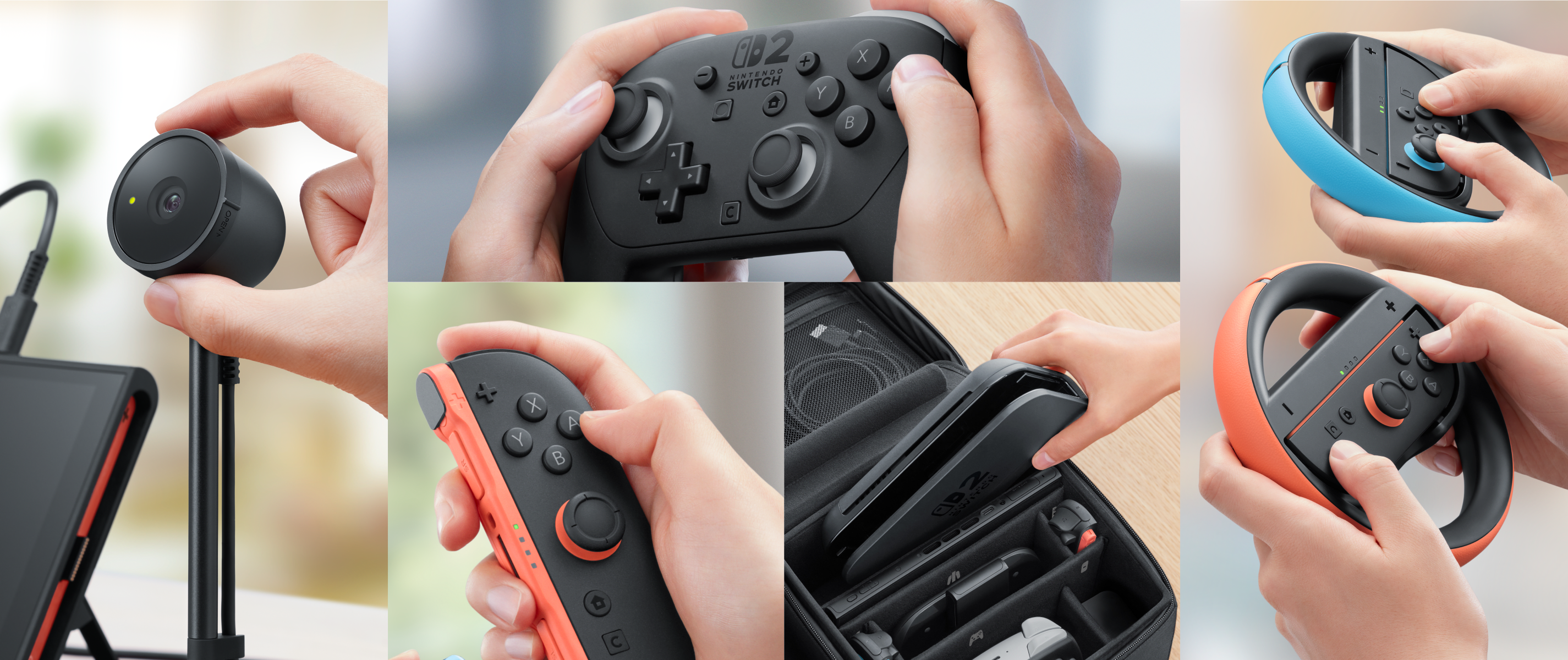
Nintendo Switch 2 accessory system
Nintendo’s Switch 2 accessory lineup. The compatibility map below identifies what an original Switch owner can keep and what changes.
Use the full setup, not one connector, when planning the move to Switch 2.
Model scope
Nintendo first-party Switch 2 accessories sold from the United States product page.
Step 4
Know what the older power adapter can do
An original Switch AC adapter can charge Switch 2 when connected directly to the console. Keep the Switch 2 adapter at the dock when TV mode is part of the setup.
A cable that charges the handheld is not proof that it supplies the dock’s required TV-mode power.
Step 5
Replace game storage with microSD Express
Use a microSD Express card for Switch 2 game storage. Keep a conventional Switch microSD card only when you need to view or import captured screenshots and videos.
Nintendo says conventional microSD cards cannot save or load Switch 2 digital games, even though captured media can still be imported.
Scope and limits
Before you apply this advice
This covers: United States owners moving from an original Nintendo Switch, Switch OLED Model, or Switch Lite setup to Nintendo Switch 2 and checking first-party controllers, dock, power, HDMI, and storage.
This does not cover: Third-party docks, chargers, controllers, capture cards, cases, or microSD products; game-by-game software compatibility; repair; Canada-specific support inferred from United States-facing sources; or United Kingdom, European Union, Australia, Japan, and other-region SKUs, menus, power rules, warranties, prices, and availability.
- Do not force rail-mounted original Joy-Con onto the magnetic Switch 2 attachment points.
- Do not use a conventional microSD card as Switch 2 game storage.
- Do not assume direct handheld charging proves that an adapter can power the Switch 2 dock.
- Do not extend Nintendo’s first-party compatibility statements to an unverified third-party accessory.
Sources
Where the facts come from
- 01Nintendo SupportNintendo Switch and Nintendo Switch 2 accessory compatibility
Nintendo Americas English compatibility table for original Joy-Con and Pro Controller use, charging limits, dock and power differences, HDMI, microSD, and shaped controller accessories. Re-opened September 14, 2026.
- 02Nintendo SupportDifferences between Nintendo Switch 2 and Nintendo Switch accessories
Nintendo Americas identification guide for Joy-Con attachment, Pro Controller controls, docks, adapters, game cards, and microSD Express markings. Re-opened September 14, 2026.
- 03NintendoNintendo Switch 2 accessories
Nintendo United States product page for Switch 2 controllers, dock set, AC adapter, camera, and microSD Express requirement. Re-opened September 14, 2026.