Start with what you see
Let the result choose the next step
Soundbar is not detected
Recheck both labeled ARC/eARC ports and enable CEC on the TV.
The control or return-audio handshake has not formed.Stereo works but Atmos does not
Confirm the content, service tier, source device, TV pass-through, and received format.
The physical link works; a format condition in the chain is limiting output.Dolby Digital Plus Atmos works, TrueHD Atmos does not
Confirm that both TV and soundbar support eARC and that eARC is enabled.
ARC can carry common streaming Atmos, while lossless TrueHD Atmos requires eARC on this link.Audio breaks after another device is connected
Disconnect that device and test again; inspect its CEC settings.
The added device is likely interfering with CEC rather than the soundbar failing.
Step 1
Use the shortest working cable run
Disconnect other HDMI devices. Connect the TV’s ARC/eARC port directly to the soundbar’s TV/ARC/eARC port, then select the soundbar as the TV audio output.
This proves return audio before a console, receiver, switch, or streaming box can interfere with CEC.
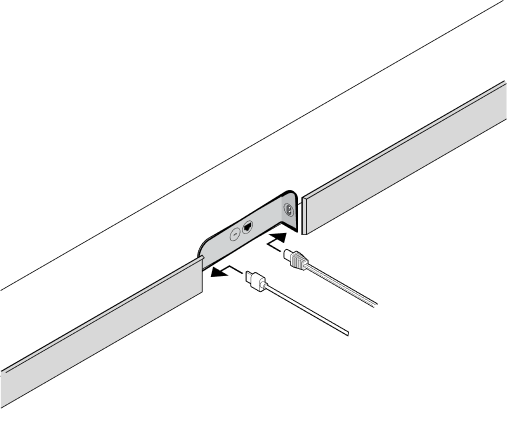
Insert HDMI into the soundbar HDMI port
Sonos’s connector illustration shows the HDMI plug and the power lead as distinct connectors before the other end goes to the TV’s labeled ARC or eARC port.
Match the HDMI connector shape in the Arc’s rear bay, fully insert it there, and route the other end only to the TV port labeled ARC or eARC.
Model scope
Sonos Arc hardware shown as a concrete ARC/eARC connection example; other soundbars use their own labeled TV-output port.
Sonos Arc setup and cable connection
Sonos demonstrates placement, cable connection from 0:34, and the app setup sequence for an Arc home-theater installation.
Use the cable segment to verify physical routing, then compare the app’s detection step before changing TV format settings.
Model scope
Sonos Arc setup shown by Sonos; TV menu names and non-Sonos soundbar inputs differ.
Step 2
Turn on CEC before tuning formats
Enable the TV’s HDMI control or CEC setting and its ARC/eARC control. Leave the TV digital-audio output on Auto or Pass-through for the first test.
ARC products commonly depend on CEC for discovery and control. Format tuning cannot fix a missing control handshake.
Step 3
Prove basic TV audio
Play a built-in TV app or broadcast source and confirm sound, mute, and volume control. Do not test Atmos first.
A simple stereo or 5.1 source proves basic ARC before you chase codec, app-tier, and source-device limits.
Step 4
Verify the received format
Open the soundbar’s status screen or app and check the actual incoming format. Then test a title known to include the format you expect.
An Atmos badge in a streaming app does not prove that the TV delivered Atmos to the soundbar.
Step 5
Reconnect one HDMI device at a time
Reconnect each console, receiver, or streaming device individually and retest TV audio and volume control after every connection.
CEC faults can come from another HDMI device. Adding devices one at a time shows which connection breaks the system.
Scope and limits
Before you apply this advice
This covers: United States TVs and soundbars or AV receivers that exchange audio through HDMI ARC or HDMI eARC. Canada is not claimed from the cited United States Sonos and HDMI Licensing sources alone.
This does not cover: Optical-only systems, Bluetooth audio, inventing model-specific menu names; United Kingdom, European Union, Australia, Japan, or other-region hardware SKUs, menu translations, electrical or radio rules, warranty and support policies, prices, or availability the cited United States sources do not support. Use each device manual to map the controls below.
- Stop changing format settings if the TV never detects an ARC/eARC audio device; return to ports, CEC, and the direct cable run.
- Do not factory-reset every device before recording the working and failing connection states.
- Contact the manufacturer when the correct labeled ports and direct supplied cable still fail with all other HDMI devices removed.
Sources
Where the facts come from
- 01Sonos SupportTV requirements for Sonos home theater speakers
United States Support re-opened 2026-09-06: ARC/eARC requirements for Arc, Beam, and Amp; optical fallback limits CEC and voice control; Atmos needs HDMI ARC or eARC.
- 02Sonos SupportListen to Dolby Atmos audio from your TV on Sonos
United States Support re-opened 2026-09-06: ARC can carry Dolby Digital Plus Atmos; lossless TrueHD Atmos needs eARC; check the format in the Sonos app, not only a streaming badge.
- 03Sonos SupportHDMI error in the Sonos app
United States Support re-opened 2026-09-06: enable TV CEC, disconnect other HDMI devices, then reconnect one at a time to find interference.
- 04HDMI Licensing AdministratorUltra High Speed HDMI Cable Certification Program
Official cable naming and certification context; PDF retrieved 2026-09-06.
- 05SonosSonos Arc product guide
Official connector identification and HDMI-to-TV ARC or eARC cabling. Live HTML returned Access Denied on 2026-09-06; keep the cited CDN connector still mapped to this URL and rely on the other Sonos Support articles for procedure claims.
- 06SonosHow to set up Sonos Arc
Official Sonos setup video with cable connection beginning at 0:34 and app setup that follows.