Start with what you see
Let the result choose the next step
The receiver never appears under Sound Output
Recheck both labeled ARC/eARC ports, confirm Anynet+ (HDMI-CEC) is enabled, and test the TV and audio device alone with a known-good HDMI cable.
The HDMI return-audio discovery has not formed, so codec changes are premature.Built-in TV apps play but one external source does not
Inspect that source connection and its audio-output format without changing the proven TV-to-soundbar link.
The TV return channel works; the remaining fault is upstream of it.Audio works but the receiver never reports Atmos
Verify the exact title, service tier, source output, TV setting, and receiver capability.
Basic HDMI audio is proven, but one Atmos condition in the full chain is not met.Audio stops after another HDMI device is connected
Remove that device and repeat the previously working test.
The added device or its HDMI control behavior changed the system state.
Step 1
Use the labeled ARC or eARC ports
Connect the Samsung TV HDMI port labeled ARC or eARC directly to the soundbar or receiver port labeled TV-ARC, ARC, or eARC. Disconnect other HDMI devices for the first test.
Samsung identifies the labeled return-audio ports as the required connection. A normal TV HDMI input cannot return TV audio to the soundbar.
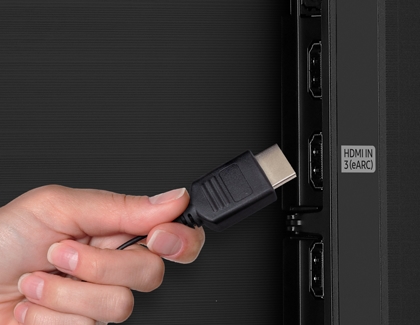
Use the Samsung TV port labeled eARC
Samsung’s support image shows the physical label that marks the TV return-audio port versus ordinary HDMI inputs.
Read the socket label on the TV itself and use the port that explicitly includes ARC or eARC.
Model scope
Samsung TV HDMI return-audio connections; the port number can differ by model.
Step 2
Enable Anynet+ (HDMI-CEC)
Open Settings → External Device Manager and enable Anynet+ (HDMI-CEC). On older TVs, open Settings → System → Expert Settings and enable Anynet+ (HDMI-CEC). Enable Anynet+ (HDMI-CEC) for HDMI-connected external audio devices.
Samsung documents Anynet+ (HDMI-CEC) as the CEC brand toggle used with HDMI-connected devices. Leave Atmos codec claims for the Expert Settings step that follows.
Step 3
Select the external audio device
Open Settings, choose Sound, then Sound Output, and select the connected receiver or HDMI audio device shown by the TV.
A correct cable does not prove the TV has switched from its own speakers to the discovered external audio output.
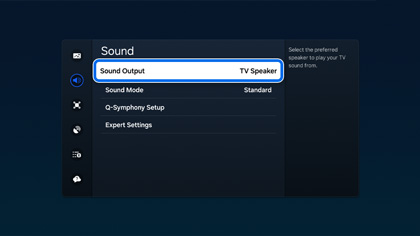
Select the connected device under Sound Output
The Sound Output screen is the checkpoint between a physical HDMI connection and actual external-speaker selection.
If the connected receiver is absent here, return to port and cable discovery instead of tuning Atmos.
Model scope
Samsung TV menus represented by this support example; names and layout can vary by software version.
Step 4
Set a supported digital format
Under Sound > Expert Settings, start with Digital Output Audio Format set to Auto. Enable Dolby Atmos when the TV presents that setting and the downstream device supports it.
Samsung documents Auto and the Dolby Atmos control as the starting TV-side settings for HDMI/eARC Atmos.
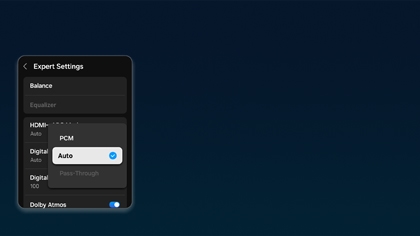
Start with Auto and verify the Atmos control
Samsung’s example places both the digital-output format and Dolby Atmos control in Expert Settings.
Confirm Auto is selected and the Atmos control is available before judging the external source or soundbar.
Model scope
Compatible Samsung TVs with the documented Expert Settings controls.
Step 5
Finish the remaining checks
Prove audio with a built-in app
Play ordinary audio in a built-in TV app, confirm sound and volume control, then test known Atmos content and read the format on the soundbar or receiver.
The built-in app removes an external source and its HDMI output settings from the first diagnosis.
Reconnect sources one at a time
Reconnect each console or streaming box individually. Set that source to bitstream or unprocessed audio only when its official instructions use that mode, and retest after every connection.
Samsung notes that an external device must output the expected format; adding devices one at a time shows which connection changes the result.
Scope and limits
Before you apply this advice
This covers: United States Samsung TVs with HDMI ARC/eARC soundbar or AV receiver setups documented in the cited Samsung US Support articles. Menu labels can vary by model year within those United States pages. Canada is omitted because no separately verified Canadian first-party eARC procedure is cited here.
This does not cover: Optical-only or Bluetooth speaker setups; inventing lossless or Atmos claims the full chain does not support; Anynet+ setup beyond the CEC toggle needed for return audio; Canadian menu labels, policies, or SKUs inferred from United States-only Samsung Support; United Kingdom, European Union, Australia, Japan, or other-region hardware SKUs, menu translations, warranty and support policies, prices, and availability the cited United States sources do not support.
- Do not factory-reset the TV while the labeled-port and built-in-app tests are still unproven.
- Do not assume an Atmos badge proves the soundbar received Atmos; read the downstream status display or app.
- Stop using a loose or visibly damaged HDMI socket and contact Samsung or the audio-device manufacturer for service.
Sources
Where the facts come from
- 01Samsung SupportConnect your cable box and other devices to your Samsung TV
United States Support independently re-opened 2026-09-07 under the current page title: HDMI ARC soundbar section covers HDMI IN (ARC) on the TV, HDMI OUT (TV-ARC) on the soundbar, and Sound Output selection. The eARC port still image remains in that article.
- 02Samsung SupportSet up and manage Dolby Atmos on your Samsung soundbar
United States Support independently re-opened 2026-09-07: Atmos needs HDMI; Samsung says Atmos works when connected using eARC; Expert Settings Digital Output Audio Format Auto or Dolby Digital; enable Dolby Atmos; external device bitstream/unprocessed; confirm DOLBY ATMOS on the soundbar display.
- 03Samsung SupportControl your Samsung TV with third-party remotes
United States Support independently re-opened 2026-09-07: Anynet+ (HDMI-CEC) under Settings → External Device Manager; older TVs Settings → System → Expert Settings → Anynet+ (HDMI-CEC). Supports the CEC toggle used with HDMI-connected devices; does not document Atmos codec claims.
- 04HDMI Licensing AdministratorEnhanced Audio Return Channel (eARC)
Standards definition of eARC as an advancement over ARC, including high-bitrate and object-based formats. Context only; not a Samsung menu sequence. Independently re-opened 2026-09-07.