Start with what you see
Let the result choose the next step
The receiver shows Atmos for every title
Check whether Continuous Audio is on and compare a known Atmos title with ordinary stereo content using the app’s audio information.
On some older receivers, the display can reflect the continuous Dolby MAT connection rather than the original mix of the current title.The Dolby Atmos option is missing in Apple TV settings
Reconnect Apple TV directly to the Atmos-capable receiver or soundbar and confirm that device input supports the expected audio format.
Apple TV is not detecting an Atmos-capable connection; forcing a lower format does not fix that detection.Atmos works through the receiver but not through the TV ARC connection
Keep the direct Apple TV-to-receiver connection.
The TV return connection is the limiting link, consistent with Apple’s ARC warning.Atmos works in one app but not another
Verify the second app, title, region, and subscription tier currently provide Atmos.
The hardware connection works; the difference is content or app entitlement.Video also drops when Atmos fails
Test the direct route with a known-good cable and another supported HDMI input.
The fault is broader than the audio-format setting and may be the HDMI link.
Step 1
Use Apple’s direct Atmos connection
Connect Apple TV 4K HDMI directly to an HDMI input on the soundbar or receiver. Connect that device’s HDMI output to the TV input.
Apple documents this as the route for high-bandwidth Atmos and warns that most TVs cannot pass that Apple TV format over ARC.
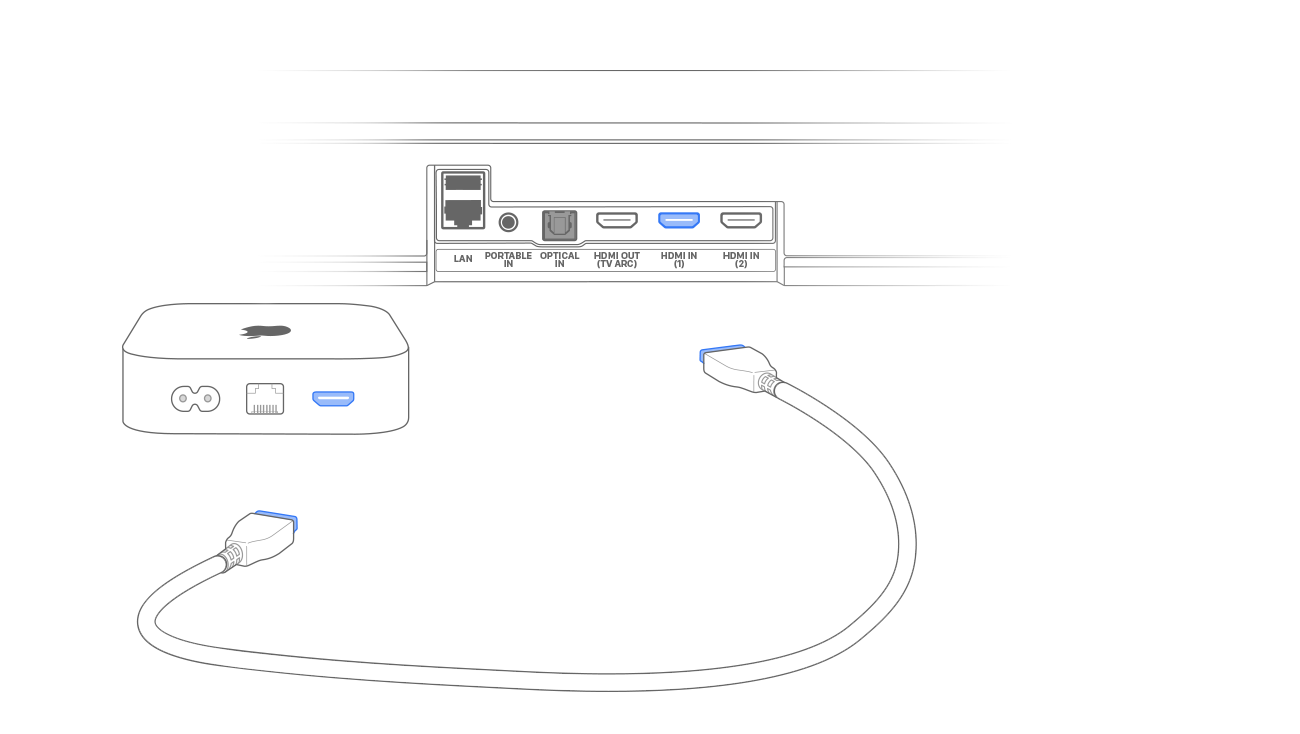
Connect Apple TV directly to the audio device
The first HDMI link runs from Apple TV 4K into the Atmos-capable soundbar or receiver, not into an ordinary TV input.
Follow the arrow from Apple TV HDMI output to the audio device HDMI input and label that cable before testing.
Model scope
Apple TV 4K systems using an HDMI-input soundbar or AV receiver.
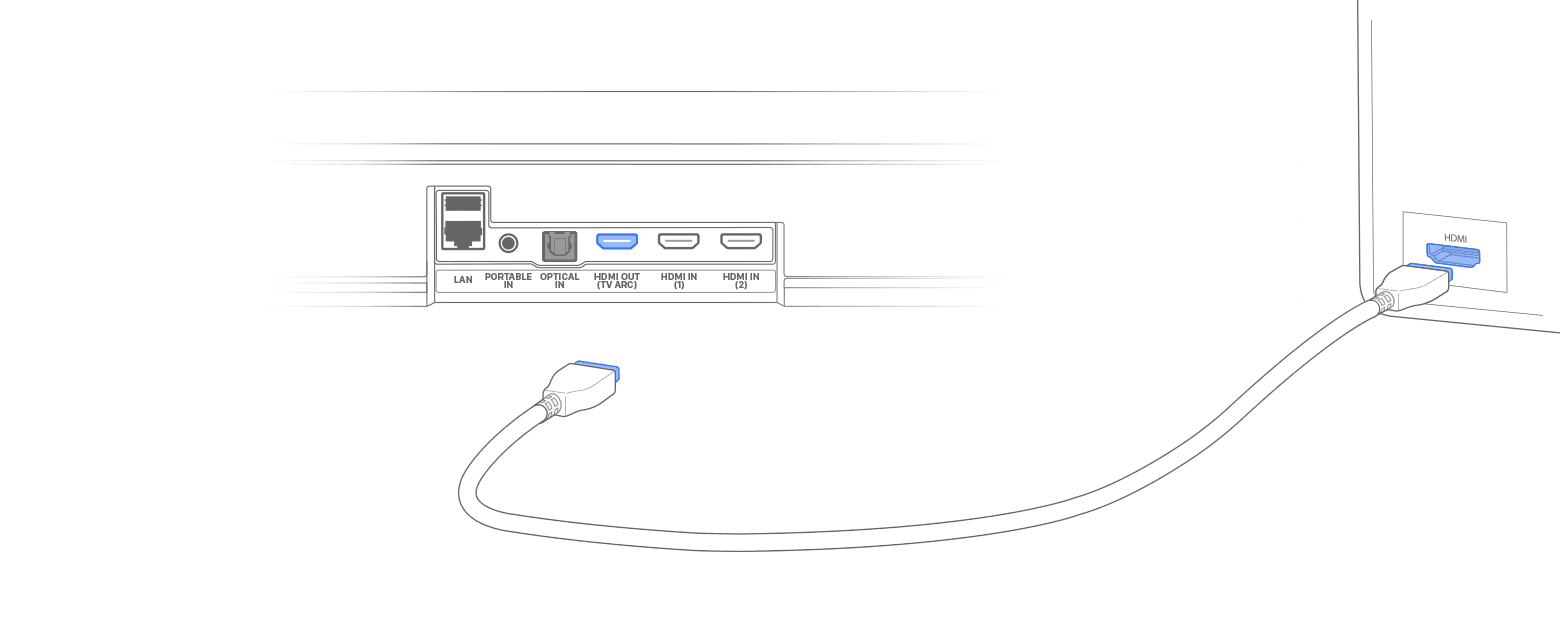
Send video onward from the audio device to the TV
The second HDMI link carries the receiver or soundbar output to the TV after the audio device has accepted the Apple TV signal.
Verify the cable leaves the audio device HDMI output and enters the TV HDMI input specified by both manuals.
Model scope
The direct Apple TV 4K Atmos topology documented by Apple.
Step 2
Confirm the Dolby Atmos control
On Apple TV, open Settings > Video and Audio > Audio Format and verify Dolby Atmos is on under Immersive Audio.
Apple states that a missing Atmos option can indicate that the home-entertainment setup needs to change.
Step 3
Read Continuous Audio before trusting the receiver label
In Settings > Video and Audio > Audio Format, record whether Continuous Audio is on. Apple says it keeps a Dolby MAT connection active for smoother format transitions, and some older receivers may continue to indicate Atmos even when the original content plays in its intended non-Atmos format.
The receiver display can describe the persistent connection rather than prove that the current title contains an Atmos mix.
Step 4
Keep Quick Start enabled
Leave Quick Start on in Apps > iTunes Movies and TV Shows unless a current app places the equivalent control elsewhere.
Apple requires Quick Start for Dolby Atmos playback from supported Apple video content.
Step 5
Finish the remaining checks
Verify content and received format
Play a title that the supported app currently labels Atmos, open its audio information when available, and compare it with ordinary stereo content without changing cables. Use the receiver display as a supporting signal, interpreted with the recorded Continuous Audio setting.
No single clue is enough: a catalog badge can vary by title or subscription, while Continuous Audio can make an older receiver’s Atmos indicator stay on for non-Atmos source content.
Isolate one link at a time
If the direct route fails, test another documented HDMI input and a known-good cable while leaving all Apple TV settings unchanged. Reintroduce switches or TV passthrough only after direct Atmos works.
A controlled swap identifies a cable or input failure without destroying the known configuration.
Scope and limits
Before you apply this advice
This covers: United States Apple TV 4K systems connected to a Dolby Atmos-capable television, soundbar, or AV receiver through HDMI, using the cited Apple Support United States procedures.
This does not cover: Older Apple TV models without Atmos support, AirPlay speaker groups, optical-only systems, defective speaker drivers, Canada-specific behavior, or other-region hardware, menus, services, and support policies not covered by the cited United States sources.
- A persistent Atmos label on an older receiver does not prove every source track is Atmos when Continuous Audio is on.
- Do not use Change Format as proof that the Atmos-capable connection works; it can intentionally select another format.
- Do not buy new speakers before the direct Apple TV-to-receiver route and current content entitlement are tested.
- Stop and contact Apple or the audio-device manufacturer when Atmos remains absent on the documented direct connection with known-good HDMI hardware.
Sources
Where the facts come from
- 01Apple SupportSet up Dolby Atmos or surround sound on Apple TV with a sound bar or AV receiver
United States Support re-opened 2026-09-21: direct HDMI topology, ARC limitation, Atmos setting, Quick Start requirement, and setup-detection guidance.
- 02Apple SupportPlay audio in Dolby Atmos or surround sound on your Apple TV 4K
United States Support published March 24 and re-opened 2026-09-21: current Audio Format controls, Change Format behavior, Dolby Atmos toggle, Continuous Audio’s persistent Dolby MAT connection, and the warning that older receivers may indicate Atmos while original non-Atmos audio plays as intended.