
The useful differences
What changes when you use it
Both players cover 4K, HDR, and Dolby Vision. Ultra earns its larger box when you need a cable to the router, local USB media, or a remote that is easier to find and recharge.
Shape
No shelf space
Ports stay reachable
Network
Use reliable Wi-Fi
Add a stable cable
Remote
TV power and volume
Rechargeable, backlit, finder
Extra port
Streaming only
Attach supported local media
Audio and HDR extras
Enough when the rest of the system is basic
Useful only when the full chain supports it
Confirm the two Roku models
Streaming Stick 4K plugs straight into an HDMI port and stays behind the TV. Ultra sits beside the TV as a separate box. It adds ports and Voice Remote Pro. The comparison covers those two current U.S. models, not every Roku player.
If you have not decided to replace your current Roku, make that decision before choosing a new model.
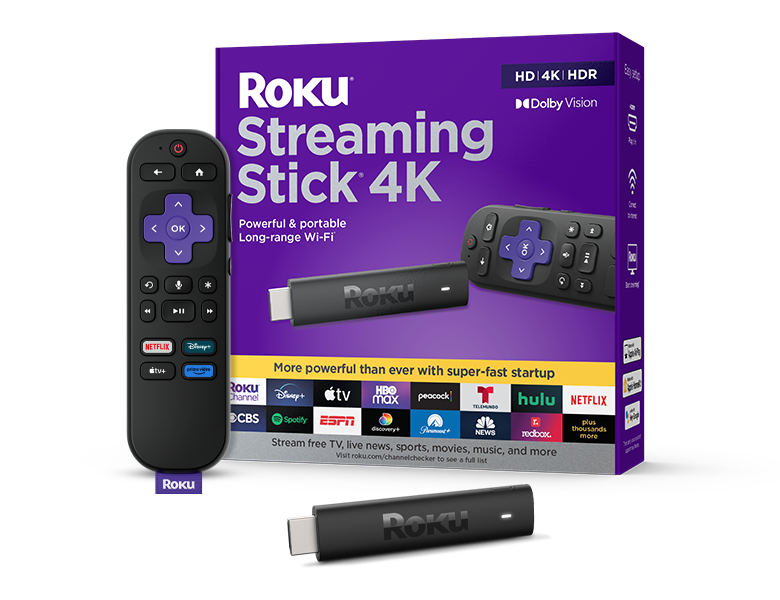
Roku Streaming Stick 4K product identification
Official Roku United States Streaming Stick 4K PDP still identifies the stick and retail box. It does not demonstrate streaming performance, Wi-Fi range, or picture quality.
Match the slim HDMI stick and Voice Remote before applying Stick 4K selection criteria.
Model scope
Roku Streaming Stick 4K identification from the United States PDP carousel still.
Compare published picture and Atmos rows
Both players list 4K, HDR, and Dolby Vision. Ultra also lists HDR10+ and Dolby Atmos audio features. Those extras work only when the TV, sound system, app, and title support the same format. Roku calls Ultra 30% faster than its other players; that is Roku’s claim, not a GearCurrent benchmark.
Do not pay for a format the rest of your setup cannot use.
Compare remotes and networking classes
Stick 4K includes a Voice Remote with TV controls and uses Wi-Fi 5. Ultra includes the rechargeable Voice Remote Pro with backlit buttons and a lost-remote finder. It also adds Wi-Fi 6 and 10/100 Ethernet.
Ultra is worth more when a network cable or the better remote fixes a problem you have now.
Check the ports and cable route
Stick 4K uses HDMI for the TV connection and USB for power. Ultra has separate HDMI, Ethernet, USB 3.0, and power ports. Check the space behind the TV and where each cable would run before you buy.
The better choice is the one that fits the actual TV cabinet and network connection.
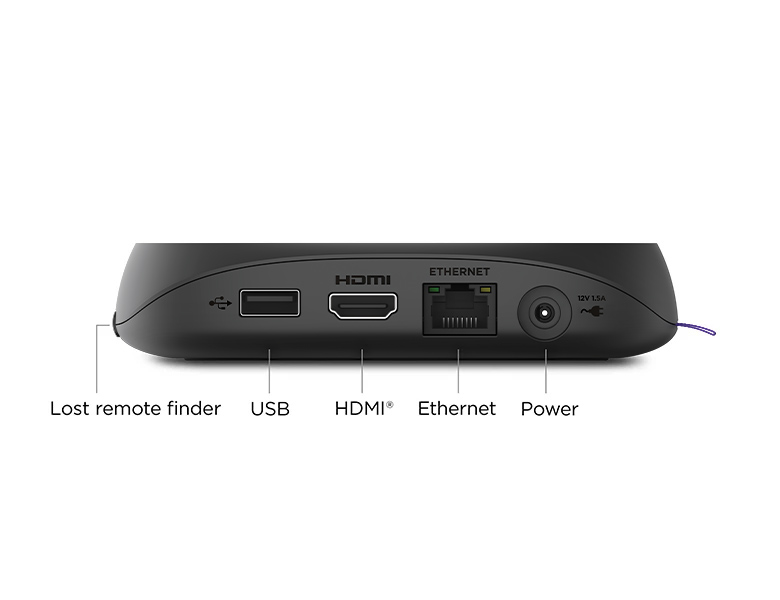
Roku Ultra ports identification
Official Roku United States Ultra PDP gallery still identifies Ethernet, USB, HDMI, and power ports on the set-top chassis. It does not demonstrate throughput or Atmos performance.
Confirm the Ultra port layout when Ethernet or USB is part of the purchase decision.
Model scope
Roku Ultra port identification from the United States PDP gallery still.
What still depends on your situation
Consider Streaming Stick Plus only if it fits
Streaming Stick Plus is another 4K HDR stick in Roku’s U.S. range. Its own page lists HDR10, HDR10+, and HLG. It does not list Dolby Vision in the same way as Stick 4K. Read the specifications on the exact product page rather than a nearby recommendation card.
Choose Plus only when its own format list meets your needs.
Finish the replacement decision first
If you own an older Roku, first check whether it still receives the apps and updates you need. After you buy, set Display type against the TV’s supported HDR formats. Compare Fire TV only if you are still open to leaving Roku.
Replacement, setup, and cross-brand shopping are separate decisions. Finish one before starting the next.
Make the choice
Choose the situation that sounds like yours
Wired Ethernet and Wi-Fi 6 appear on Ultra’s opened United States product page.
Remote generation is a first-party selection criterion.
Form factor is a Stick 4K differentiator on its product page.
Related-product cards on Plus HTML are not Plus specifications.
Scope and limits
Before you apply this advice
This covers: United States buyers choosing between current Roku Streaming Stick 4K and Roku Ultra using the opened United States Roku product pages and players hub. Canada is not named because no Canadian first-party PDP or availability page is cited here.
This does not cover: Streambar soundbar hybrids, Ultra LT Walmart-only SKUs without a separate first-party row, prices, stock, “best Roku” rankings, Fire TV cross-brand shootouts as the primary decision, Canadian price or stock inferred from United States PDPs, and United Kingdom, European Union, Australia, Japan, or other-region hardware SKUs, menus, warranties, or availability the cited United States Roku pages do not support.
- Do not publish a “best Roku” ranking or invent speed benchmarks beyond Roku’s attributed Ultra marketing claim.
- Do not infer Canadian price, stock, or SKU availability from United States product pages.
- Do not present Streambar hybrids or Ultra LT as covered options here.
- Do not copy Fire TV comparison criteria into this Roku-only selection.
Sources
Where the facts come from
- 01RokuRoku Streaming Stick 4K
United States Stick 4K PDP for 4K/HDR/Dolby Vision positioning, long-range Wi-Fi, slim HDMI stick form factor, Voice Remote with TV controls, 802.11ac networking, and USB power/port framing. Independently re-opened 2026-09-06.
- 02RokuRoku Ultra
United States Ultra PDP for “30% faster” marketing claim, 4K/HDR/Dolby Vision, Dolby Atmos audio features, Wi-Fi 6 / 802.11ax, Ethernet, USB 3.0, and Voice Remote Pro (backlit, rechargeable, finder). Independently re-opened 2026-09-06.
- 03RokuRoku Streaming Stick Plus
United States Stick Plus PDP for optional mid-tier 4K HDR stick positioning; related Stick 4K Dolby Vision cards on the same HTML are not Plus specs. Independently re-opened 2026-09-06.
- 04RokuRoku streaming players
United States players hub for current lineup identity among Stick, Stick Plus, Stick 4K, Ultra, and Streambar SE. Independently re-opened 2026-09-06.