Start with what you see
Let the result choose the next step
No IR light appears after installing fresh batteries
Try another camera if you have one, then replace the remote if the light still never appears.
The remote is not sending the infrared signal Samsung expects.The Smart Remote pairs but works only at very close range
Recharge it, clear nearby obstructions, and retest after the TV and remote restart.
Pairing succeeded; power, interference, or hardware range is still in doubt.The TV does not respond to its physical controls either
Follow Samsung’s TV power diagnostic instead of swapping another remote.
The shared problem is now the display or its power state.
Step 1
Reset and power the remote
For a battery remote, remove the batteries and hold Power for eight seconds before installing fresh batteries. Follow Samsung’s solar Smart Remote reset when that is the remote you have.
A reset clears remote state and confirms power before you try pairing.
Step 2
Test infrared output when applicable
Point the remote at a phone or digital camera and hold Power while watching for a colored infrared light on the camera screen.
Samsung uses this camera check to tell a dead IR remote from a TV sensor problem.
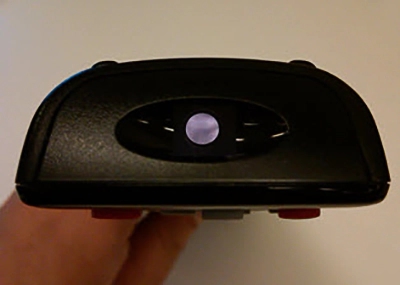
Samsung infrared-output camera test
Samsung’s support image shows the colored emitter light a phone or digital camera can reveal while an infrared remote button is held.
Watch the remote’s transmitter on the camera display while holding Power. A visible colored light means an IR signal is leaving the remote.
Model scope
Samsung infrared remotes only; Bluetooth Smart Remotes use the pairing steps and are not proven by this camera test.
Step 3
Pair a Samsung Smart Remote
Stand within one foot of the TV and hold Return plus Play/Pause for at least five seconds or until the connection message appears.
A powered Bluetooth Smart Remote needs pairing before it can control the TV reliably.
Step 4
Confirm Samsung menus before universal setup
First confirm the remote controls Samsung menus. Then troubleshoot Universal Remote Setup and the external device on their own.
The remote can drive the TV correctly while the external-device mapping is still wrong.
Scope and limits
Before you apply this advice
This covers: United States Samsung television, Odyssey Ark, or projector remotes that do not control the Samsung display, including battery, solar, infrared, and Smart Remote variants documented in Samsung US troubleshooting TSG10002214. Canada is omitted because no separately verified Canadian first-party remote procedure is cited here.
This does not cover: Internal remote repair; third-party universal remotes as the first repair; external-device control before Samsung menus work; Canadian, United Kingdom, European Union, Australia, Japan, or other-region remote layouts, menu translations, warranty and support policies, prices, or availability the cited United States Samsung Support page does not support.
- Do not open or puncture a rechargeable remote battery.
- Do not replace the remote only because external-device power control fails while Samsung menus still work.
- Request service when the TV ignores both a proven transmitting remote and its own physical controls.
Sources
Where the facts come from
- 01Samsung SupportSamsung remote is not working
Official United States battery and solar reset, IR camera test, Smart Remote pairing, TV isolation, and universal-control steps. Independently re-opened 2026-09-07.