Start with what you see
Let the result choose the next step
Other devices are also offline
Inspect router status and confirm the ISP connection.
The TV is not the first fault to fix.TV sees the network but rejects the password
Forget or reset the network and re-enter the exact password.
The TV can see the network; the saved password or security handshake is failing.Ethernet works but Wi-Fi does not
Update the TV, compare signal near the router, and test the Wi-Fi bands documented for the model.
Internet and TV apps work over Ethernet; the wireless connection still fails.TV connects but apps still fail
Check internet status, time, service outages, and the affected app.
A Wi-Fi connection alone does not prove apps can reach their services.
Step 1
Read the network status first
Open All Settings → Connection → Network → Network Status and note any error before changing anything. Some models place Network under General settings.
Samsung’s United States guide uses Network Status errors to choose the next repair instead of an immediate TV reset.
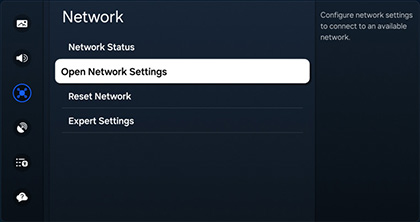
Open Network settings on a Samsung TV
Samsung’s United States guide highlights Network so you can open wireless settings and confirm whether the home network is listed before resetting the television.
From All Settings choose Connection → Network (or General → Network on some models), then use Open Network Settings → Wireless and Network Status before changing passwords or factory-resetting.
Model scope
United States Samsung Smart TVs that show the Connection → Network layout documented in TSG10002209; labels can vary by model year.
Step 2
Compare one nearby device
Use a phone beside the TV on the same Wi-Fi. If it also fails, restore the router or internet service first.
A second device shows whether signal, router, or internet service is the real problem.
Step 3
Restart the network gear in order
Power off the TV, power-cycle the network equipment, wait for internet service to return, then start the TV and reconnect.
The TV cannot obtain a working address while the router or modem is still starting or offline.
Step 4
Update software when Wi-Fi stays down
If Wi-Fi remains unavailable after Network Status checks, install the current TV software using Ethernet or a USB update via Support → Software Update as Samsung documents.
Samsung’s United States guide places firmware update ahead of a full TV reset when the wireless connection still fails.
Step 5
Reset only the saved network
Use All Settings → Connection → Network → Reset Network, then select the correct Wi-Fi and enter its password again.
A network reset clears the saved connection without erasing every TV preference and app session.
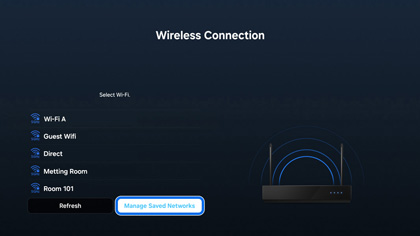
Manage saved networks before reconnecting
Samsung’s United States article shows Manage Saved Networks as part of clearing a bad wireless association before selecting the correct SSID again.
After Reset Network, return to the wireless list, choose the exact home network name, and re-enter the password with capitalization preserved rather than factory-resetting first.
Model scope
United States Samsung Smart TVs that expose Manage Saved Networks or Reset Network under Connection → Network in TSG10002209.
Scope and limits
Before you apply this advice
This covers: United States Samsung Smart TVs, Odyssey Ark, and projectors that cannot find or connect to Wi-Fi, following Samsung US troubleshooting TSG10002209. Menu labels can vary by model year within that United States article. Canada is omitted because no separately verified Canadian first-party Wi-Fi procedure is cited here.
This does not cover: ISP account activation, captive-portal networks, enterprise Wi-Fi, damaged Wi-Fi hardware, model-specific service-menu work, inventing Device Care steps not present on the cited United States article, or using Mexico or other-region Network Status stills as United States evidence. Excludes United Kingdom, European Union, Latin America, Singapore, Australia, Japan, or other-region Samsung SKUs, menu translations, warranty and support policies, prices, and availability the cited United States Samsung Support page does not support.
- Do not factory-reset the television while the router or ISP is also offline.
- Do not repeatedly enter passwords until the exact Wi-Fi name and keyboard case are confirmed.
- Contact Samsung when Ethernet works and supported Wi-Fi remains unavailable after software and network reset checks.
Sources
Where the facts come from
- 01Samsung US SupportSamsung TV will not find or connect to my Wi-Fi network
United States Network Status checks, Open Network Settings / Wireless checks, password and signal checks, Reset Network, power-cycle, USB/Ethernet Software Update, and wired-network steps. Supplies the Network and Manage Saved Networks stills used below. Wrong ID TSG01002209 is not used; Mexico Status7/Status8 stills are not retained. Independently re-opened 2026-09-07.